Weather Forecast - Live Radar
- 0.0
- Rating
- 10.00K
- Installs
- Free
- Price
 Analysis by App-foxy
Weather Forecast - Live Radar takes a practical approach to checking the sky: it combines a regular forecast with live radar and a weather update that appears after a phone call. I found that combination more useful than a simple temperature screen because it fits the way many people actually use weather apps. I usually want a quick answer before leaving home, not a long report, and the app is built around that habit.
My overall view is positive, with one important qualification. This is a convenient weather companion for everyday decisions, especially when I want a fast glance after being away from my phone. It is less convincing as a complete replacement for a specialist weather service when I need deep forecasting detail, highly localized warnings, or extensive customization. Its strongest idea is not the forecast alone, but the timing of the information around a phone call.
How Weather Forecast - Live Radar fits into daily use
The app comes from Freshness and sits in the weather category as a free app for everyone. It reached Android users on June 1, 2024, and its current version is 26.2.1. The app requires Android 10 or later, so it suits many relatively recent phones but will not be available to people holding on to older Android hardware.
You May Also Like

 AccuWeather: Weather Radar
AccuWeather Review: A Quick, Clear Forecast for Everyday Decisions
For everyday plans, the best forecast is the one you can understand quickly. AccuWeather makes rain timing, radar, and local conditions easy to act on, with a few trade-offs.

 Hill Climb Racing
Why Hill Climb Racing Still Turns Crashes Into One More Run
A tiny car, a bumpy hill and one more upgrade: Hill Climb Racing keeps resurfacing because its simple chaos makes every near-miss feel personal.

 AliExpress - Shopping App
AliExpress Makes Global Shopping Feel Personal, but Shoppers Bear the Risk
AliExpress turns a global marketplace into a pocket-sized discovery engine. Its reach is useful, its shopping loop compelling, and its trade-offs easy to miss.

 Lords Mobile: Kingdom Wars
Lords Mobile Is a Kingdom-Building Routine, Not a Quick Match
A case-by-case verdict on the building, battles, device demands, and social commitments that make Lords Mobile rewarding for some players and exhausting for others.

 PDF Scanner app - TapScanner
TapScanner Makes Paperwork Easier to Capture, Check, and Share
TapScanner makes scanning with a phone feel less like a rescue operation and more like a dependable step in getting work done. Its capture tools are useful, though not flawless.

 Block Blast!
 Shows How Much a Puzzle Game Can Leave Out
A quiet grid game shows why puzzle players increasingly value instant clarity, repeatable skill and low-pressure play—and where the genre still needs to catch up.
More From Our News Desk
View All News


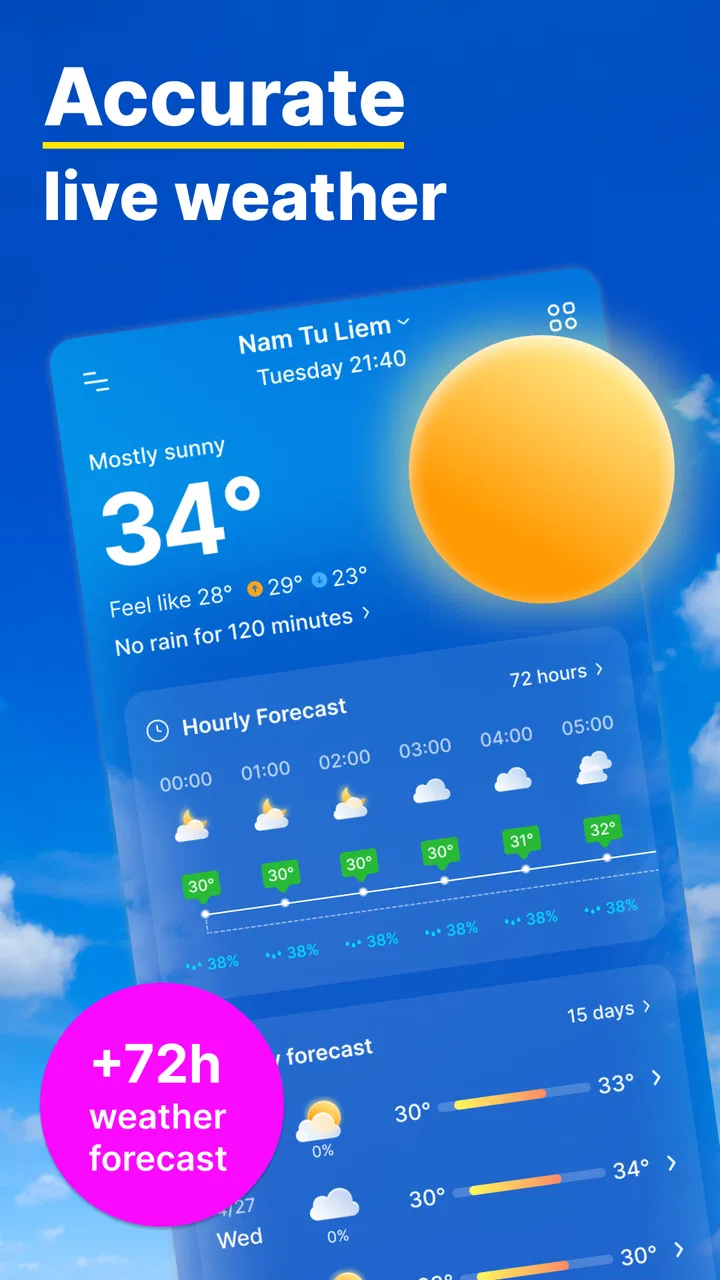
The store summary points to three connected parts: weather forecasts, live radar, and updates after a call. In practice, I see these as serving different moments. The forecast helps me plan ahead, radar helps me judge what is happening nearby right now, and the after-call update is useful when I have just finished a conversation and want to reorient myself before going outside.
That last behavior gives the app a more specific identity than the usual forecast shortcut. A weather app normally waits for me to open it. Here, the concept is more proactive: after a call, the weather information is ready at a moment when I may be switching tasks. That can be handy for someone who spends the day moving between appointments, commuting, or working outdoors.
I would not describe the experience as a replacement for careful planning. Weather changes, and a radar image can be easy to misread if I treat it as a guarantee. Instead, I use the app as a fast decision tool: should I take an umbrella, delay a walk, wear another layer, or check a more detailed source before making a bigger commitment?
The forecast is most useful when I keep the question simple
The app makes the most sense when the question is concrete. “Can I walk to the station without getting soaked?” is a better use case than trying to build a complete travel plan from one glance. The forecast gives me a starting point, while the radar offers visual context that a row of temperatures cannot provide.
For example, I might leave work in the afternoon after a long call. Rather than opening several screens or searching the web, I can look at the current weather and radar to see whether rain is approaching my route. If the radar shows activity nearby, I can make a small adjustment—wait a little, carry rain protection, or choose transport instead of walking. That is a modest benefit, but it is exactly the sort of decision that makes a weather app worth keeping.
The after-call behavior is also relevant for people who make frequent calls during the day. A person who has just finished a client conversation, a delivery call, or a family check-in may be preparing to head somewhere else. Having weather information connected to that transition can reduce the number of separate actions needed. It is not a dramatic feature, but it feels more thoughtful than a static icon that I only remember to open when the weather already looks suspicious.
Live radar adds context, but it should not be treated as certainty
Radar is the feature I would use when the forecast feels too general. A forecast might suggest rain during a broad period, while radar can help me understand whether precipitation is moving toward my area or already passing. That distinction matters when I am deciding whether to leave immediately or wait.
There is a useful trade-off here. Radar is more visual and immediate than a simple forecast, but it also asks more from the user. Colors, movement, and coverage can be confusing, particularly when a weather system is scattered. I would take a moment to compare the radar view with the forecast instead of relying on a single frame. The best workflow is to use the forecast for the broad plan and radar for the near-term choice.
This is one of the app’s non-obvious strengths: it encourages a two-step check rather than forcing me to choose between a forecast list and a map. I can first ask what the day generally looks like, then use the radar only when timing matters. That keeps the app practical instead of turning every weather check into a detailed investigation.
The after-call update is convenient, with a clear privacy and attention trade-off
The after-call weather update is the feature that will decide whether this app feels special or unnecessary. For me, it is useful when calls are part of a busy routine. It places weather information at a natural pause in the day, which can be more effective than relying on memory to open an app later.
At the same time, any feature that presents information around phone calls can feel intrusive to users who prefer a quiet, tightly controlled phone experience. Some people will appreciate the shortcut; others may see it as another interruption. I would recommend trying the behavior during a normal day and deciding whether it helps or distracts. A feature can be well designed and still not suit someone’s habits.
This is also where I would avoid installing the app solely because the idea sounds clever. If I rarely make calls, or if I already have a weather widget that I check automatically, the after-call update may not change my routine. Its value depends on timing, not just on the existence of the forecast.
What the free version means for a careful user
The app is free to install, which makes it easy to test without committing money at the start. It also includes in-app purchases ranging from $2.99 to $16.99 per item. That does not automatically make the free experience poor, but it does mean I would pay attention to which parts of the experience are available without purchasing anything and whether optional extras genuinely improve my routine.
My advice is simple: use the free version long enough to judge the forecast, radar, and after-call behavior together. Do not buy an item just because the app is useful in principle. First decide whether you open it regularly, whether the radar changes your decisions, and whether the call-related update is helpful rather than distracting. A paid enhancement is easier to evaluate once the basic habit is established.
For households, the Everyone content rating is reassuring from a general suitability perspective. It is a weather utility rather than an entertainment app, so its appeal is broad. Still, the practical question is not age but routine: children, older relatives, commuters, and outdoor workers may all use it differently depending on how much detail they want.
Where it falls short compared with familiar weather alternatives
The usual alternatives are built-in phone weather panels, large weather services, browser searches, and specialist radar tools. A built-in widget is often faster for a single glance at temperature or conditions. A major weather service may be a better choice for extensive location management, detailed alerts, historical information, or a more mature forecasting interface. A browser search is useful when I want an answer without adding another app.
Weather Forecast - Live Radar earns its place through the combination of radar and the after-call update. If those two ideas do not matter to me, the app may feel less necessary than the weather tool already on my phone. This is the main limitation I would explain to a friend: it has a clear angle, but that angle is narrower than the feature lists of some established alternatives.
I also would not choose it as my only source for safety-critical decisions. For severe weather, long-distance travel, outdoor work in changing conditions, or events where timing matters greatly, I would cross-check with a trusted local source. A convenient app can support a decision without being the sole authority behind it.
Another point is that radar works best when I understand the scale of the map and the direction of movement. Someone who wants a plain “take an umbrella or not” answer may find a radar screen more information than necessary. Conversely, someone who wants professional-level analysis may find a general-purpose app too limited. The app sits between those extremes: more informative than a basic icon, less specialized than a dedicated meteorological tool.
Three practical ways I would use it
My first workflow would be for commuting. Before leaving, I would check the forecast for the broad conditions, then open live radar only if rain appears likely. After arriving somewhere, an after-call update could provide a quick reminder before the return trip. This avoids repeatedly studying the map while still using it when timing is uncertain.
The second workflow would be for short outdoor plans. If I were deciding whether to walk, cycle, shop, or take a child to a nearby park, I would compare the general forecast with the radar rather than trusting either one alone. If the forecast looked acceptable but the radar showed a nearby band moving in, I would shorten the plan or choose a location with shelter. The useful insight is that radar can change the timing of an activity even when it does not change the whole day’s forecast.
The third workflow would be for people who move between calls and physical tasks. A tradesperson, courier, property worker, or field employee may finish a call and immediately need to decide what to wear or whether to protect equipment. The after-call update can fit that transition better than a widget that requires remembering to check it. I would still keep expectations realistic: it helps with awareness, not with replacing proper planning for a full workday.
A fourth, quieter use is simply building a consistent habit. I would check the forecast once in the morning, use radar only when conditions look unsettled, and treat the after-call update as a prompt rather than an instruction. That prevents the app from becoming noisy. The best result comes from letting each feature answer a different question.
Who should install it, and who should skip it
I think the app is a good fit for someone who wants more than a basic weather icon but does not want to manage a complicated weather platform. It is especially appealing if I make many calls, spend time commuting, or often need to decide whether to go outside in the next hour. The free entry point also makes it reasonable to test on a compatible Android phone.
It may also suit users who prefer visual information. The radar gives a different kind of understanding from a text forecast, and some people can judge approaching rain more easily from movement on a map than from a list of hourly conditions. If that is how I naturally think about weather, the app’s design direction makes sense.
I would skip it if I only need a tiny glance at the temperature and already have a reliable widget. I would also look elsewhere if I need extensive forecasting tools, advanced alert management, or a highly specialized radar experience. The app’s focused feature set is a strength for the right user, but it is not a reason to abandon every other weather source.
People who dislike automatic prompts around calls should be cautious as well. Even though the idea is convenient, it changes when weather information appears. I would rather test that behavior than assume it will fit my phone habits. The right weather app is partly about accuracy and partly about whether its timing respects the way I use my device.
My verdict after weighing convenience against depth
Weather Forecast - Live Radar is a sensible free weather app with a distinctive daily-use idea. Freshness has focused on the gap between checking a forecast and remembering to check one at all. Live radar gives the app practical visual context, while the after-call update can turn a routine phone moment into a useful weather reminder.
Its weaknesses are just as clear. The call-related behavior will not appeal to everyone, radar requires a little interpretation, and users seeking a full-featured professional weather service may want a different tool. The in-app purchase range also means I would evaluate optional spending carefully instead of assuming every enhancement is necessary.
The app has passed 10K+ installs and carries a 0.0 average rating, so I would not use its current popularity or rating as a substitute for personal testing. I would judge it by the questions that matter in my own routine: does the radar help me make better short-term decisions, and does the after-call update arrive at a useful moment?
My recommendation is therefore specific rather than universal. Try it if you want a straightforward forecast with radar and you regularly move from phone calls into outdoor decisions. Keep another source available for serious weather planning. For everyday awareness, the best reason to choose this app is its workflow, not a promise of endless weather detail. If that workflow matches your day, it can become a genuinely handy companion; if not, a simpler widget or a deeper weather service will probably serve you better.
FAQs for Weather Forecast - Live Radar
01What features does Weather Forecast - Live Radar offer?
Weather Forecast - Live Radar provides real-time weather updates, detailed radar maps, and alerts for severe weather conditions. Users can customize notifications and view extended forecasts, including temperature, wind speed, and precipitation data for multiple locations. The app also offers widgets for quick access to weather information.
02Is Weather Forecast - Live Radar free to use?
Weather Forecast - Live Radar offers a free version with essential features. However, there are in-app purchases and subscription options available that provide an ad-free experience and access to premium features, such as more detailed forecasts and enhanced radar capabilities.
03How accurate is the weather data in Weather Forecast - Live Radar?
The app sources its data from reputable meteorological services, ensuring high accuracy in weather predictions. It uses advanced algorithms and real-time updates to provide users with precise weather conditions. However, as with any weather app, it’s advisable to cross-reference with local forecasts, especially for critical decisions.
04Can I customize notifications in Weather Forecast - Live Radar?
Yes, the app allows users to customize notifications based on their preferences. You can set alerts for specific weather conditions such as rain, snow, or extreme temperatures. Additionally, you can adjust the frequency and timing of these notifications to suit your daily schedule.
05Is Weather Forecast - Live Radar available for both Android and iOS?
Yes, Weather Forecast - Live Radar is available for download on both Android and iOS platforms. Users can find it on the Google Play Store and Apple App Store. It offers a consistent user experience across devices, ensuring seamless access to weather updates on smartphones and tablets.
Pros
- Accurate real-time weather updates.
- User-friendly interface with clear visuals.
- Detailed hourly and weekly forecasts.
- Customizable alerts for severe weather.
- Global coverage with location tracking.
Cons
- Ads can be intrusive at times.
- Premium features behind a paywall.
- Occasional loading delays.
- Requires constant internet connection.
- Battery drain on prolonged use.

Weather Forecast - Live Radar
Gallery